
Opening an account takes about a minute and needs no card. You start on the Free plan and can upgrade whenever you want.
What you need
- Plan: Free plan
- Time: 2 min
Step by step
Open the registration page
Go to link-ease.in/user/register, or press Register at the top of the site.
Fill in the form
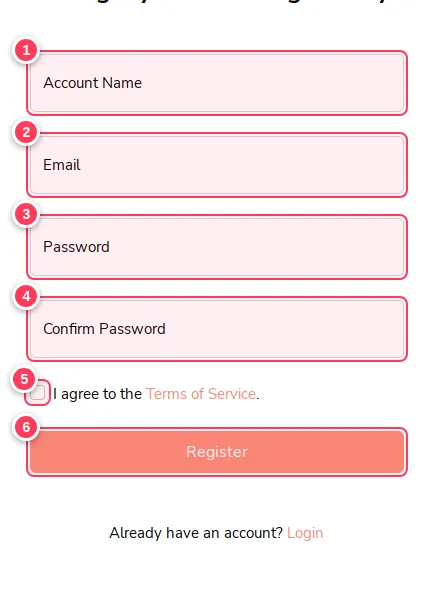
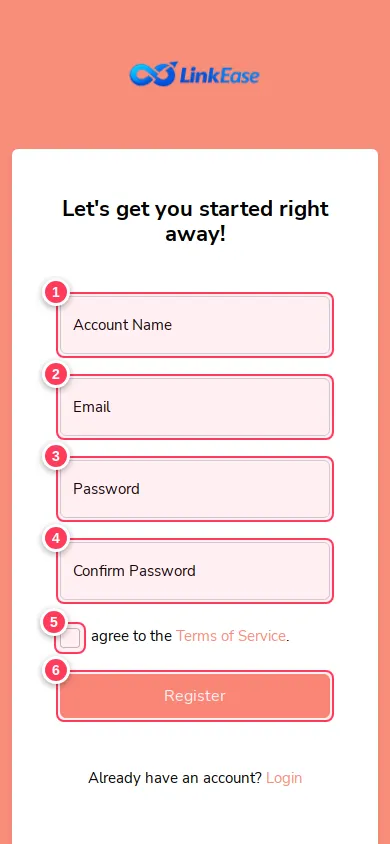
The numbers in the picture match the fields below.
- 1Account Name: the name shown in your account. You can change it later.
- 2Email: use an address you can open. We use it for sign-in and password reset.
- 3Password: choose a long one.
- 4Confirm Password: type the same password again.
- 5Tick I agree to the Terms of Service.
- 6Press Register.
Take the welcome tour (or skip it)
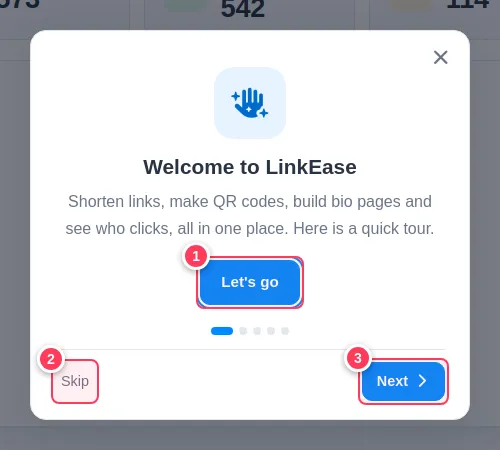
For your first 14 days a short tour opens on your dashboard. It has 5 slides.
- 1Let's go starts the tour.
- 2Skip closes it. It will not come back after you skip it on this browser.
- 3Next moves to the next slide.
Finish the tour
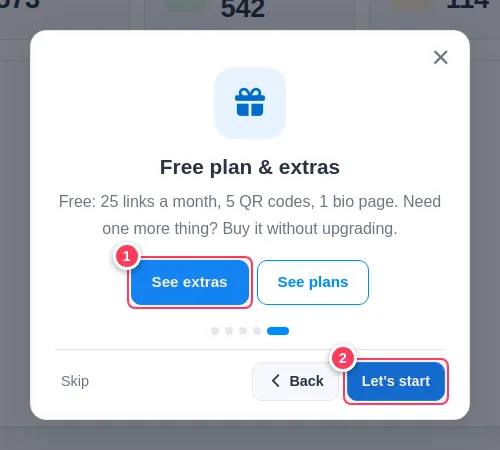
The last slide shows what the Free plan includes. Choose what suits you.
- 1See extras opens the extras you can buy without upgrading. See plans shows the plans.
- 2Let's start closes the tour and takes you to your dashboard.
Sign in next time
Open link-ease.in/user/login, enter your email and password, and you land on your dashboard.
Tip: The tour only appears for accounts less than 14 days old. If you do not see it, you are past that period or you skipped it already. You can always find the same information in this Help Center.
Common problems
I did not get a confirmation email.
Check your spam folder first. If it is not there, make sure you typed the address correctly and contact us from the Contact page.
Can I change my email or name later?
Yes. Open your account menu at the top right, then the account settings page.
Do I need a card to start?
No. The Free plan needs no payment details.