
An API key lets another program, such as the WordPress plugin or your own code, work with your LinkEase account. Here is how to find your key and create extra ones.
What you need
- Plan: Pro or Team (the API is not on Free)
- Time: 3 minutes
Important. An API key works like a password. Never post it in public, in screenshots, or in shared code. If it leaks, replace it at once.
Open the API keys page
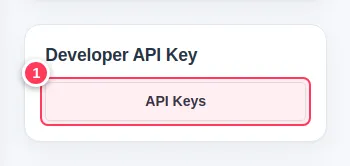
Open Settings. In the side column find the Developer API Key card and press API Keys (1).
Use the master key or make a new one
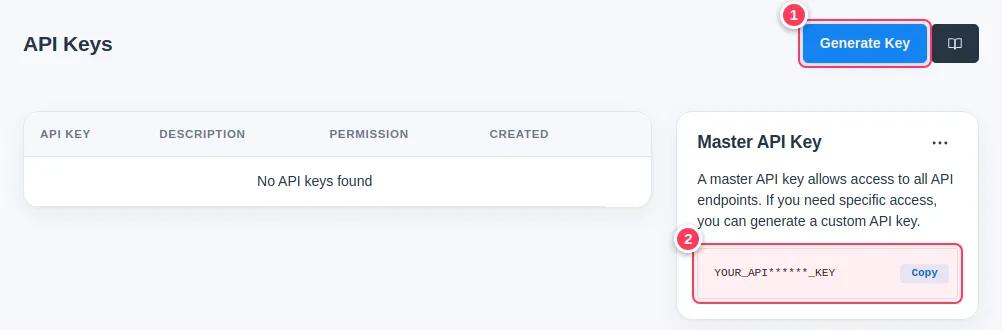
The Master API Key (2) opens all API features. It is hidden in part; use Copy to copy it. If you need limited access, press Generate Key (1).
Describe the key and choose its permissions
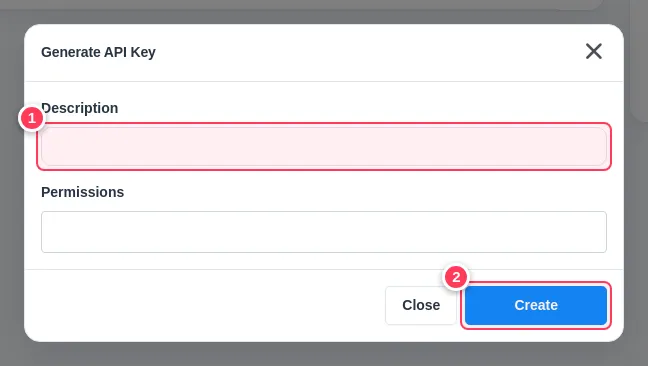
Type a Description (1) such as "Website plugin", choose the Permissions, then press Create (2). The new key appears in the table, where you can copy it or Revoke it later.
Tip. Give each program its own key. If one leaks, revoke only that key. To replace the master key open the ... menu on its card and choose Regenerate. Programs using the old master key then stop working until you update them.
Common problems
I do not see API Keys.
The API is part of Pro and Team. See Compare the plans.
Is there a limit on requests?
Yes: 300 requests per minute on Pro and 1,000 on Team.