
This article explains how you pay, what "billed monthly" really means, and where to find your payment history and invoices.
What you need
- Plan: Any plan
- Time: 3 minutes
Payment methods
At checkout you can choose Syriana Pay, which opens a secure page where you can pay by card, ShamCash, PayPal, Wise, Binance Pay or another available method, or PayPal. The methods you see can change. Prices are in US dollars.
How you are charged
- With Syriana Pay each payment buys one month or one year. It does not renew by itself: you pay again when you want more time.
- Extras, AI packs and passes are one-off payments.
Open Billing
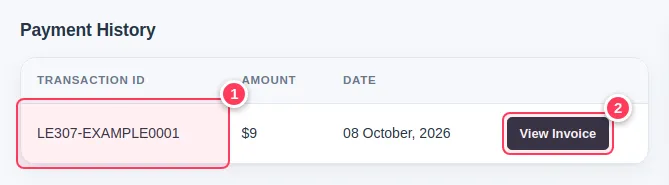
Open Billing from your account menu. Payment History lists every payment: the transaction ID (1) and the amount and date. Press View Invoice (2) to open one.
Read and print the invoice
The invoice shows the transaction ID, date, who it is billed to, the description and the total. Use the print button at the top to print it or save it as PDF.
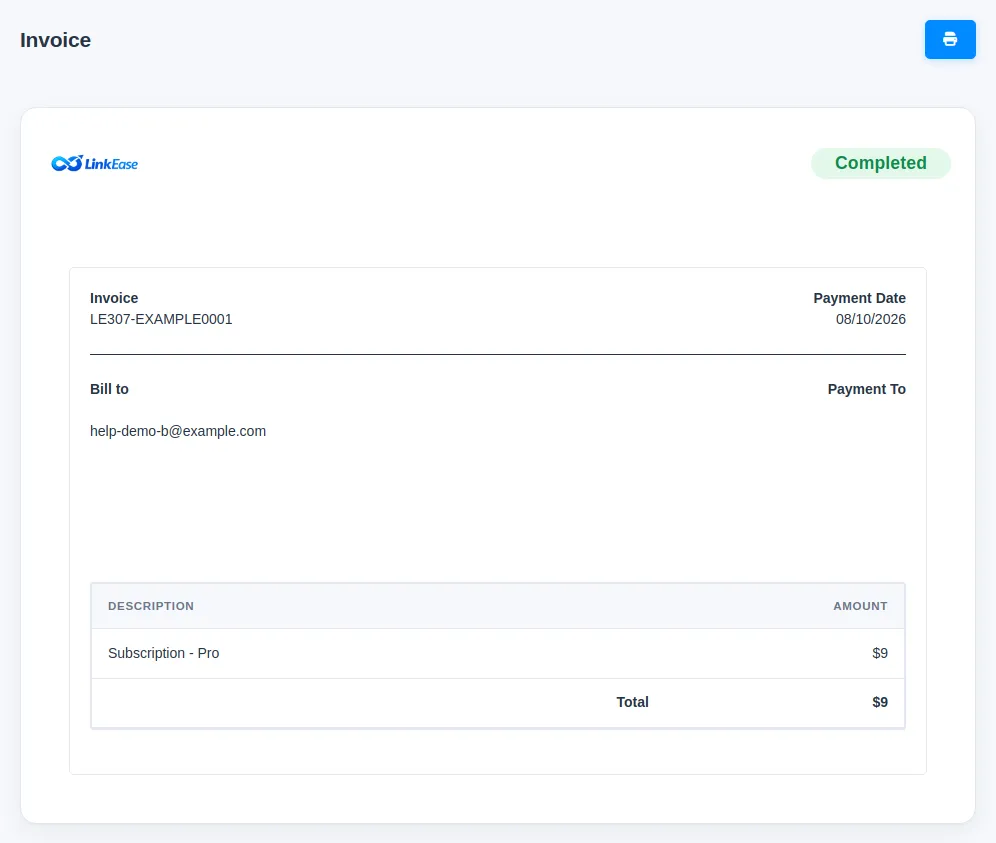
Tip. The invoice is made for the account email. Add your billing address on the checkout page or in Settings to have it on later invoices.
Common problems
I paid and nothing appears.
Wait a few minutes: it appears once the payment is confirmed. If not, contact us with your payment reference.
Do I have a voucher?
Redeem it from the card on the Billing page.