
Share your page with a link, a QR code or social buttons. With your own domain the address can look like links.yourshop.com instead of link-ease.in.
What you need
- Plan: Free plan
- Time: 4 min
Step by step
Share the page
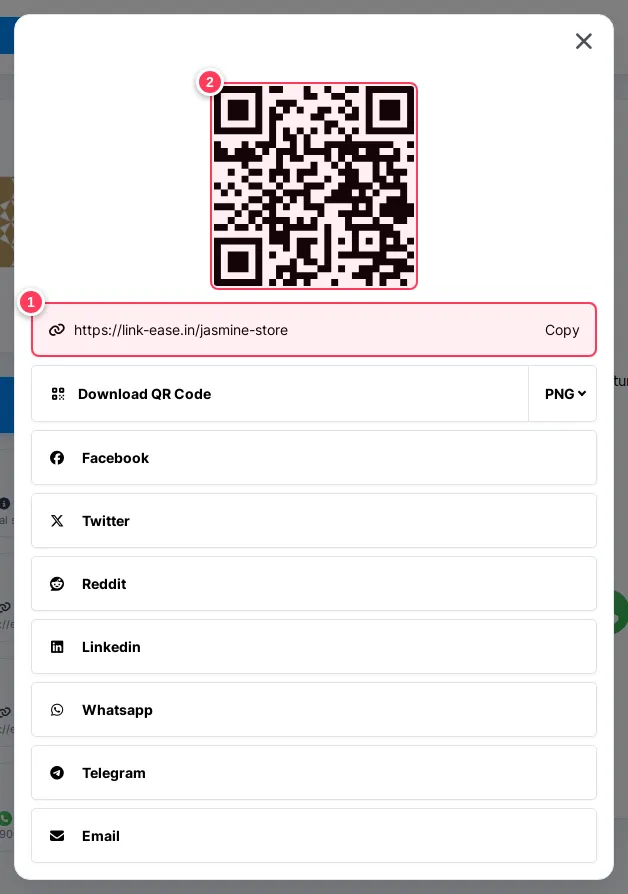
In the editor press Share (top of the page).
- 1The address of your page, with a Copy button.
- 2A QR code of the page. Use Download QR Code below it to print it.
Further down are buttons to share on Facebook, X, Reddit, LinkedIn, WhatsApp, Telegram and email.
Choose the domain and the alias
In the Content tab, next to the page name:
- 1Domain:
link-ease.inby default. With Pro you can connect your own domain and choose it here. - 2Alias: the last part of the address.
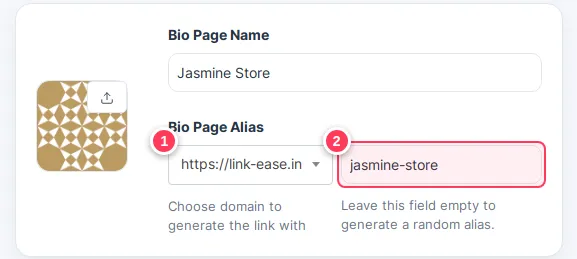
- 1Domain:
Tip: To use your own domain, first connect it in your account. See the section about your own domain in this Help Center.
Tip: Put the page address in your Instagram bio and print the QR code at your counter.
Common problems
The new domain is not in the list.
It must be connected and verified first, and your plan must include a domain (Pro).
Can I take the page offline?
Open the Settings tab of the page, or delete the page from the Bio Pages list.