
If you bought LinkEase on Microsoft Marketplace, you finish the setup on LinkEase with a short activation form. This article shows how.
What you need
- Plan: A purchase made on Microsoft Marketplace
- Time: 3 minutes
Buy on Microsoft
Subscribe to LinkEase on Microsoft Marketplace and choose your plan and billing term.
Open the activation page
Microsoft sends you to the LinkEase activation page. Your email address comes from Microsoft and cannot be changed.
Fill the form
Type your Account Name (1) and choose a Password (2). Your plan and billing term come from your purchase. Press Activate Subscription (3).
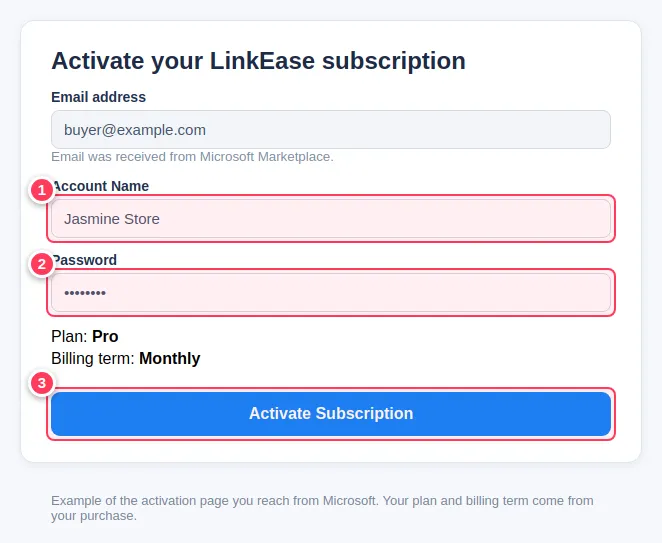
The picture is an example we drew, not a real purchase.
Sign in
Use the email and the password you chose to sign in to LinkEase.
Important. Cancellation and refunds for Marketplace purchases go through Microsoft, not through LinkEase.
Common problems
I never reached the activation page.
Go back to your Microsoft purchase and open the setup link again, or contact us.