
After you add a domain, LinkEase checks it for you and issues the HTTPS certificate automatically. Here is how to read the status and what to do for each one.
What you need
- Plan: Any plan with a domain
- Time: 2 minutes
Open Branded Domains
Open Branded Domains from the menu. Each domain has a coloured label under its name.
Read the label
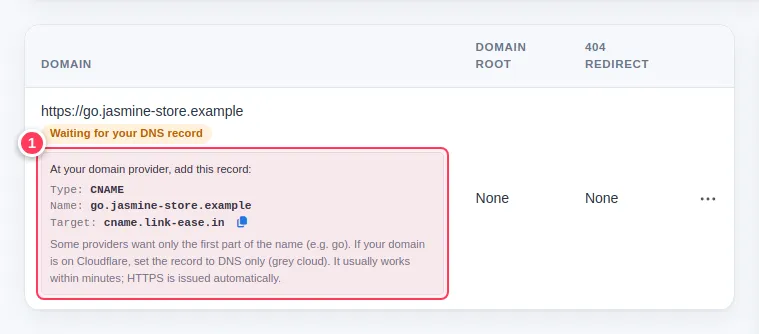
- Waiting for your DNS record (yellow): the record is not visible yet. The box shows the CNAME to create. Nothing is wrong with your account.
- Being prepared (yellow): we are preparing the domain and retry automatically. If it takes more than an hour, contact us.
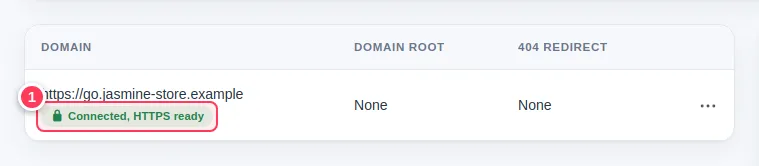
- Connected, HTTPS ready (green, with a padlock): the domain works and the certificate is issued. You can use it now.
Refresh when you have changed DNS
You do not need to press any check button. The page asks again when you open it. Give DNS a few minutes, then refresh. At some providers it can take up to 36 hours.
Tip. Using the AI assistant? Ask it: "Is go.yourshop.com connected yet?" It checks the domain for you.
Automatic HTTPS
You never buy or install a certificate. When the record is found, the certificate is issued and renewed for you. If a page on your domain shows a warning, wait a few minutes after the label turns green and try again.
Common problems
It has been waiting for hours.
Open the DNS page of your provider and compare the record with the box: type CNAME, the right name, the target cname.link-ease.in, and on Cloudflare a grey cloud.