
A domain pass is a small, one-time purchase. This article explains exactly what happens when it ends, how to renew it, and how to remove a domain you no longer need.
What you need
- Plan: Free with the 30-day pass (or any plan that includes a domain)
- Time: 3 minutes
How the pass works
- One payment of $3 gives you 30 days and one domain.
- It ends by itself. It never renews automatically and never charges you again.
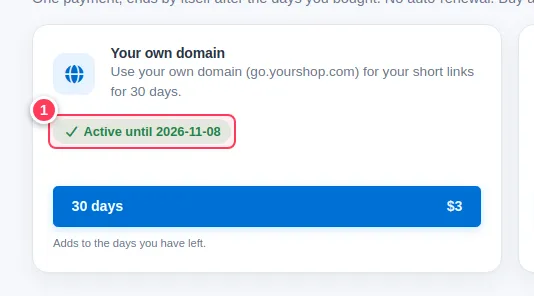
- Buy it again while it is active and the 30 days are added to the days you have left.
See when it ends
Open Extras, then 30-day passes. The Your own domain card shows Active until and the date (1).
When the pass ends
- Your old links keep working on the domain.
- You cannot add new links or domains on it, and the Branded Domains page opens the plans page instead of your list, until you renew.
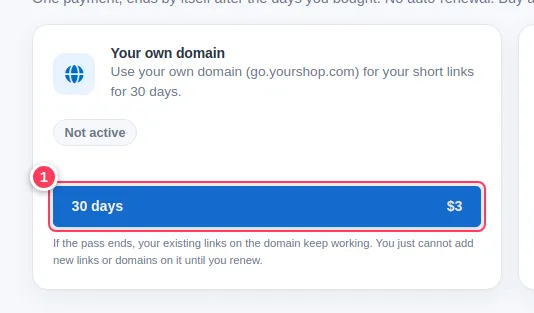
- The card goes back to Not active.
Renew
Open Extras and press the 30 days · $3 button (1) on the same card. When the payment is confirmed everything is available again.
Remove a domain
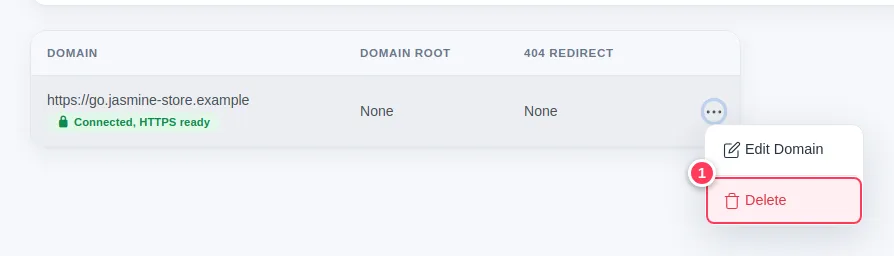
Open the menu of the domain
In Branded Domains click the ... button at the end of the row and choose Delete (1).
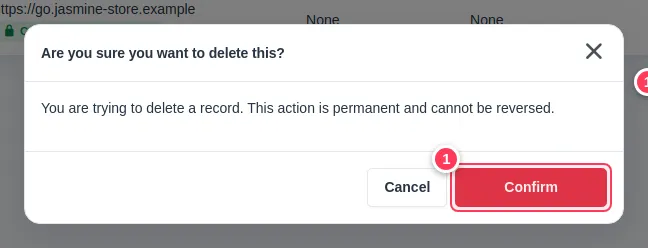
Confirm
Press Confirm (1). The action is permanent.
Important. Short links that use a deleted domain will no longer open on it. Move or recreate them first if you still need them. Afterwards you can also delete the CNAME record at your domain provider.
Tip. Team members need the permission Delete Custom Domain to remove a domain.
Common problems
My links stopped working after the pass ended.
Existing links should keep working. Check that the domain still shows Connected, HTTPS ready and that the CNAME record at your provider is still there. If they still fail, contact us.
Can I get a refund for a pass?
A pass can be refunded within 7 days of purchase only if you have not used it. See how refunds work.