
You printed 500 menus and the address changed? With a dynamic QR code you do not reprint. You change where the code leads, and the same printed code opens the new page.
What you need
- Plan: Free plan
- Time: 2 min
Step by step
Open the QR code
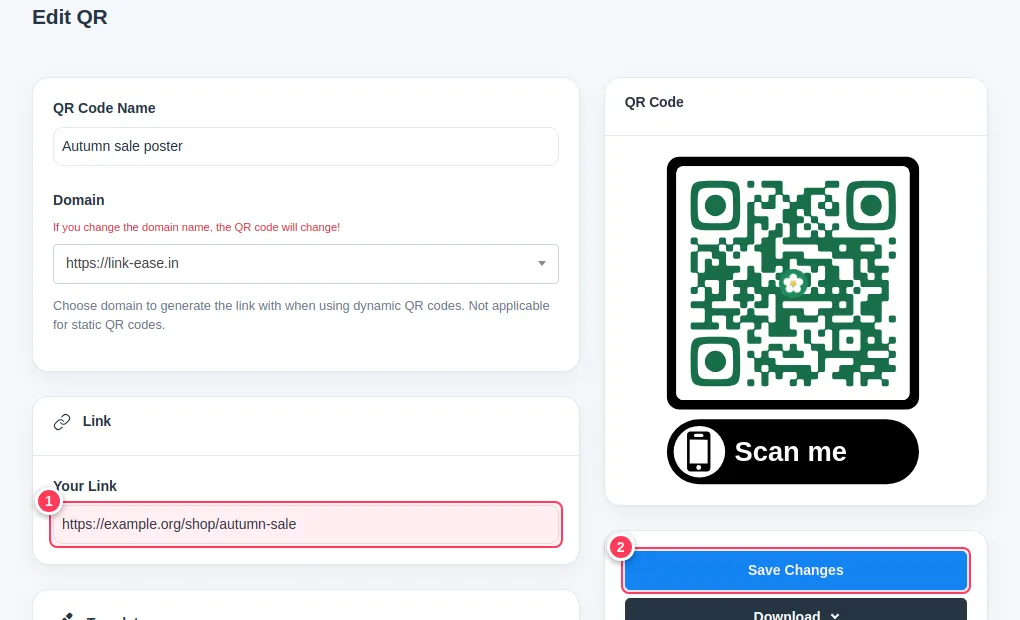
Go to QR Codes and open the dynamic code (types such as Link, Email, Phone, Whatsapp) for editing.
Change the destination and save
- 1Type the new address in the Your Link field.
- 2Press Save Changes.
Test
Scan the printed code (or open its short link). It now goes to the new page. The picture of the code does not change, so nothing needs reprinting.
Important: Static codes (Text, WiFi, Static vCard, Event) hold their data inside the picture. They cannot be changed: make a new code instead.
Common problems
How do I know if my code is dynamic?
Its type in the creator was one of the Dynamic QR group, and it has a short link and scan statistics.
Did my scan count reset?
No. Scans stay with the code.