
Need 50 product links, not one? Paste up to 10 links at once, or import a CSV file with as many as you like. Both are Pro features.
What you need
- Plan: Pro plan
- Time: 5 min
Step by step
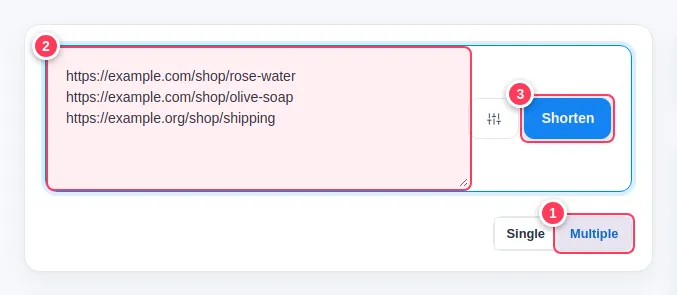
Quick way: paste up to 10 links
On your dashboard or the Links page:
- 1Open the Multiple tab.
- 2Paste one address per line (up to 10).
- 3Press Shorten.
Bigger way: import a CSV file
Open Tools in the side menu, then Import Links.
Prepare the file
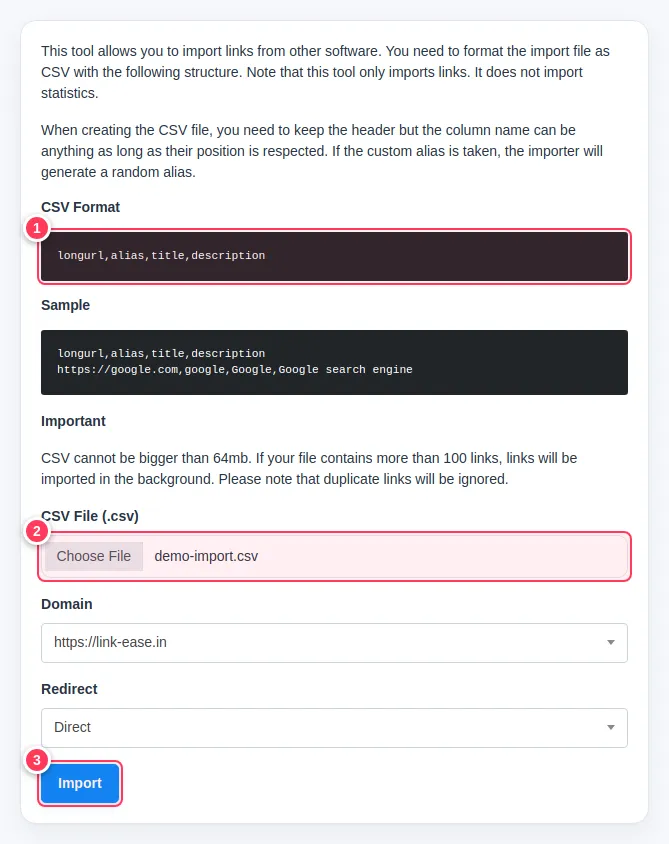
Save a CSV file whose first line is the header below. Each next line is one link; only
longurlis required.longurl,alias,title,description https://example.com/shop/rose-water,rose-water,Rose water,Rose water product page- 1The page shows the exact column order. Keep the header line; the column names can be anything as long as the order is the same.
Upload and import
- 2Choose your CSV file.
- 3Press Import.
Also choose the domain and the redirect type on the same page if you do not want the defaults.
Tip: If an alias in your file is already taken, LinkEase gives that link a random alias instead. Duplicate links are ignored. Files with more than 100 links are imported in the background, so refresh the Links page after a minute.
Important: The file cannot be larger than 64 MB.
Common problems
The Multiple tab is missing or locked.
It is part of the Pro plan.
Some links did not import.
Check each line has a full address starting with https:// and that the file is saved as CSV with the header line first.