
A deep link opens your app directly when a visitor has it installed, and sends them to the App Store or Google Play when they do not. One link works for every phone.
What you need
- Plan: Pro plan
- Time: 4 min
Step by step
Open the edit page and find Deep Linking
From Links press the three dots, Edit, then scroll to Deep Linking. The link's main URL stays the address for all other devices (computers, for example).
Turn it on and add the store links
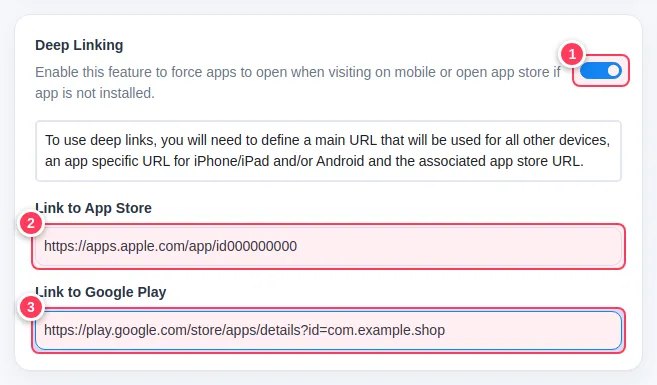
Switch the feature on, then fill in the store addresses.
- 1Turn on Deep Linking.
- 2Link to App Store: the address of your app for iPhone and iPad.
- 3Link to Google Play: the address of your app for Android.
Save and test on a phone
Press Update Link. Open the short link on an iPhone and on an Android phone. Each one goes to its own store page or opens the app.
Tip: Without an app, you do not need this. For a normal website use a plain link.
Important: Use the real store addresses of your app. The ones in the picture are examples.
Common problems
Opening the app does not work on one phone.
Some apps need extra setup on the app side to accept links. The store page still opens as a fallback.