
One short link can send different visitors to different pages: people in Saudi Arabia to one page, people in Egypt to another, iPhone users to the App Store and Android users to Google Play. Visitors who match no rule go to the link's main address.
What you need
- Plan: Pro plan
- Time: 4 min
Step by step
Open the edit page
From Links press the three dots, Edit. The targeting boxes are further down the page.
Send visitors by country
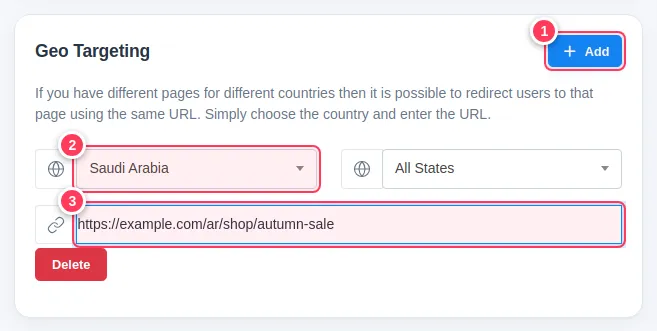
In Geo Targeting:
- 1Press Add to create a rule.
- 2Choose the country (and optionally a state).
- 3Type the page those visitors should open.
Send visitors by device
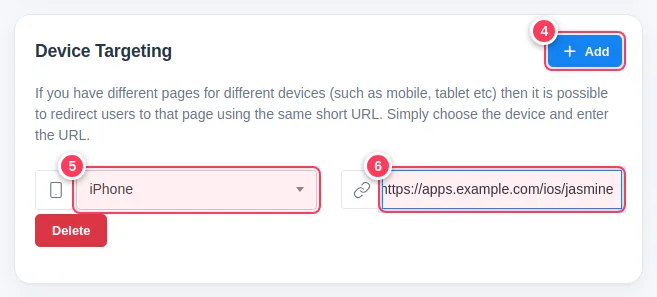
In Device Targeting:
- 4Press Add.
- 5Choose the device, for example iPhone, Android or a computer system.
- 6Type the page for that device.
Save and test
Press Update Link. Test with a phone or a VPN in the chosen country. You can add as many rules as you need and delete a rule with its red Delete button.
Tip: Always set a sensible main URL first. It is what everyone else sees.
Tip: Language targeting works the same way, in the Language Targeting box.
Common problems
My VPN test goes to the main page.
Make sure the VPN country matches the rule exactly, and open the link in a new private window.
Can I combine country and device rules?
Yes. Add rules in both boxes and test each case with the real device or country.