
Let customers message you on WhatsApp in one tap, with the first message already typed. You get a short link and a QR code you can print on a menu, a window or a package.
What you need
- Plan: Free plan
- Time: 3 min
Step by step
Open the QR creator and choose Whatsapp
Go to QR Codes, press Create QR.
- 1Under Dynamic QR choose Whatsapp.
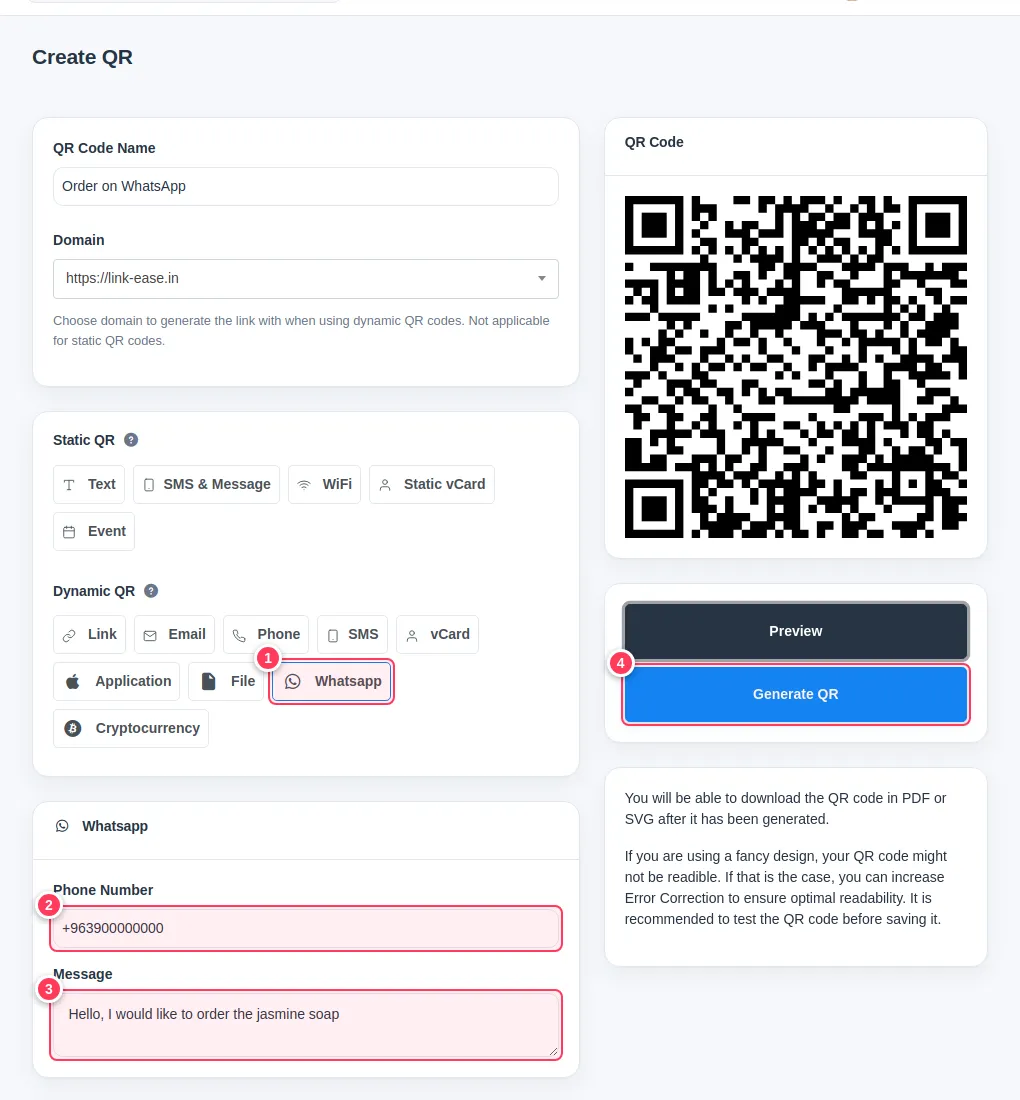
Fill in the number and the message
In the form:
- 2Phone Number: with the country code, for example
+963900000000. - 3Message: the text that will already be typed when the customer opens WhatsApp.
- 2Phone Number: with the country code, for example
Create it
Give the code a name at the top (for example "Order on WhatsApp"), then:
- 4Press Generate QR.
Share the short link or the QR
From the QR list copy the short link, or download the QR code. Anyone who scans or taps it opens a WhatsApp chat with your number and your message.
Tip: Because it is a dynamic code you can change the number or the message later without reprinting. See Change a QR code destination.
Tip: You can also add a WhatsApp Message button to your bio page. See Add links, text and buttons.
Common problems
WhatsApp opens but the message is empty.
Some phones drop the text if it is very long. Keep it short.
Does it count as a QR code on my plan?
Yes, it uses one of your QR codes for the month.